How Season Mapping Works
Seasons must exist in MPHB first — you create them under Accommodation → Seasons in the WordPress admin. SRE does not create seasons directly (except via Import Holidays or when duplicating a pricing year with season options enabled).
On the Seasons tab, SRE reads all MPHB seasons and lets you assign each one to a season type — Low, High, Holiday, Long Weekend Pro, or any custom type Pro. The season type determines which rate multiplier and default minimum stay apply.
Navigate to Hotel Booking → Smart Rate Engine → Seasons.
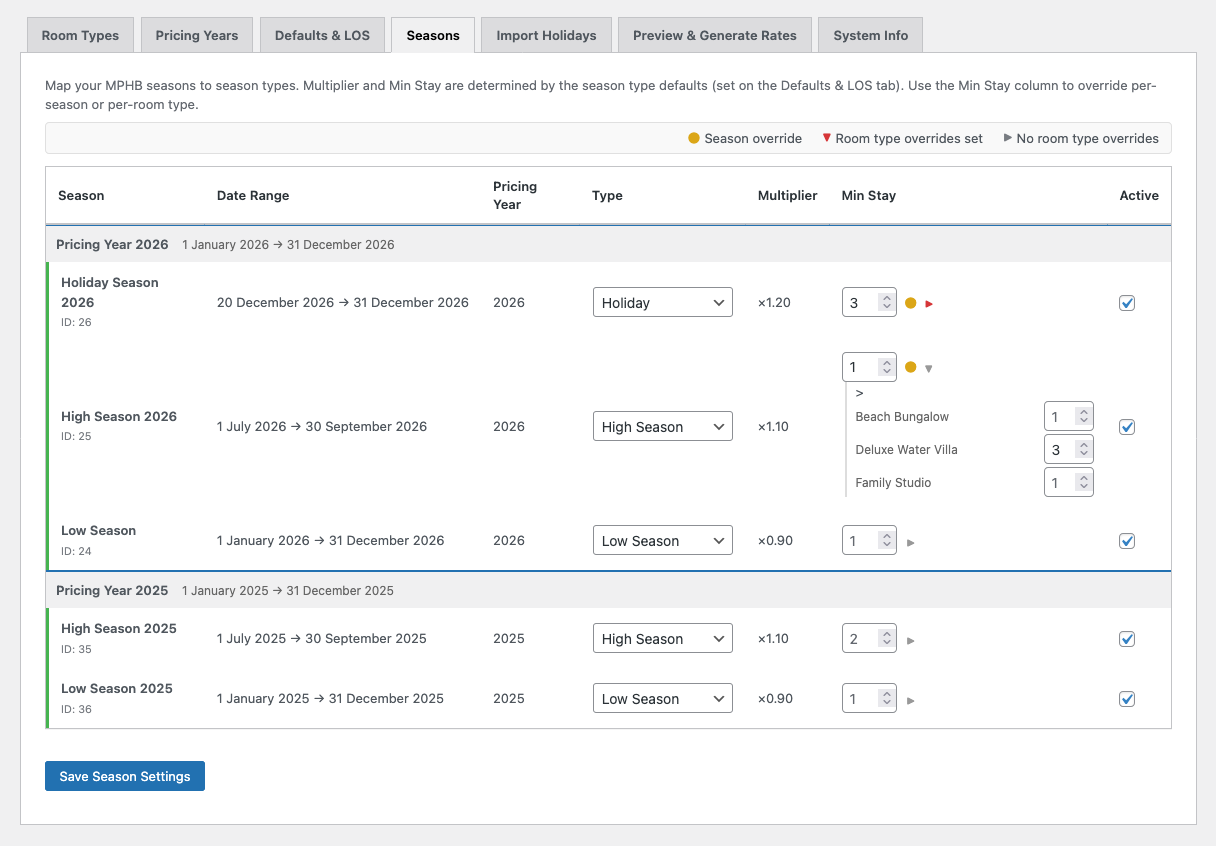
Season Details
Each season row shows the season name, date range, pricing year it belongs to, assigned type, inherited multiplier, minimum stay value, and an active/inactive toggle.
The pricing year is determined automatically based on the season's start date and the configured year start date. You don't set this manually.
The multiplier is inherited from the season type defaults (configured on Defaults & LOS). It's shown for reference — you don't edit it here.
If an MPHB season exists but no matching pricing year has been created in SRE, the season row will display a warning: "Pricing year not yet created in Smart Rate Engine." This typically happens with seasons from previous years that SRE doesn't need to manage. You can safely ignore these — or create the corresponding pricing year on the Pricing Years tab if you do need to generate rates for that period.
Minimum Stay Overrides
SRE manages minimum length of stay (MLS) through a three-layer system. This gives you granular control without unnecessary complexity:
Layer 1 — Type default: Set on the Defaults & LOS tab. Every season of that type inherits this value. For example, all Holiday seasons default to 3-night minimum.
Layer 2 — Season override: Override the type default for a specific season. For example, Christmas might need a 5-night minimum even though other holidays only need 3.
Layer 3 — Room type override: Override the season value for a specific room type within a specific season. For example, your Family Studio might allow 2-night stays during Christmas while other room types require 5.
The most specific rule wins. Visual indicators on the Seasons tab show which level is active:
| Indicator | Meaning |
|---|---|
| ● Yellow dot | Season-level override is set (differs from type default) |
| ▼ Purple marker | Room type overrides are set for this season |
| ► Triangle | No room type overrides — click to expand and add them |
When seasons overlap (for example, a Long Weekend falling within High Season), MPHB enforces the most restrictive minimum stay across all overlapping seasons. A Long Weekend with MLS 3 inside a High Season with MLS 4 will enforce MLS 4. This is MPHB's native behaviour — SRE doesn't need to manage this logic.
MLS Sync
When you save the Seasons tab, SRE automatically syncs all minimum stay rules to MPHB's booking rules. MLS rules with a minimum of 1 night are omitted — that's MPHB's default, so writing it would be redundant.
The status bar shows the total count of active MLS rules synced to MPHB.
Activation and Deactivation
Each season has an Active checkbox. Deactivating a season excludes it from rate generation and MLS sync without removing it from the list. This is useful for temporarily disabling a season — for example, if a promotional period is paused but you want to keep the configuration for later.
Season Limits
Both Free and Pro support unlimited seasons per pricing year.
Pro unlocks season duplication and the Long Weekend and custom season types.