What Is a Pricing Year?
A pricing year is a container for your base rates and surcharges. Each pricing year is independent — you can have different base rates for 2026 and 2027 simultaneously, allowing you to plan ahead or adjust rates year-over-year without affecting the current year's configuration.
By default, pricing years run January 1 to December 31. The rollover date is configurable with Pro — useful for operators whose seasons align to a non-calendar year (for example, April 1 to March 31).
Navigate to Hotel Booking → Smart Rate Engine → Pricing Years to get started.
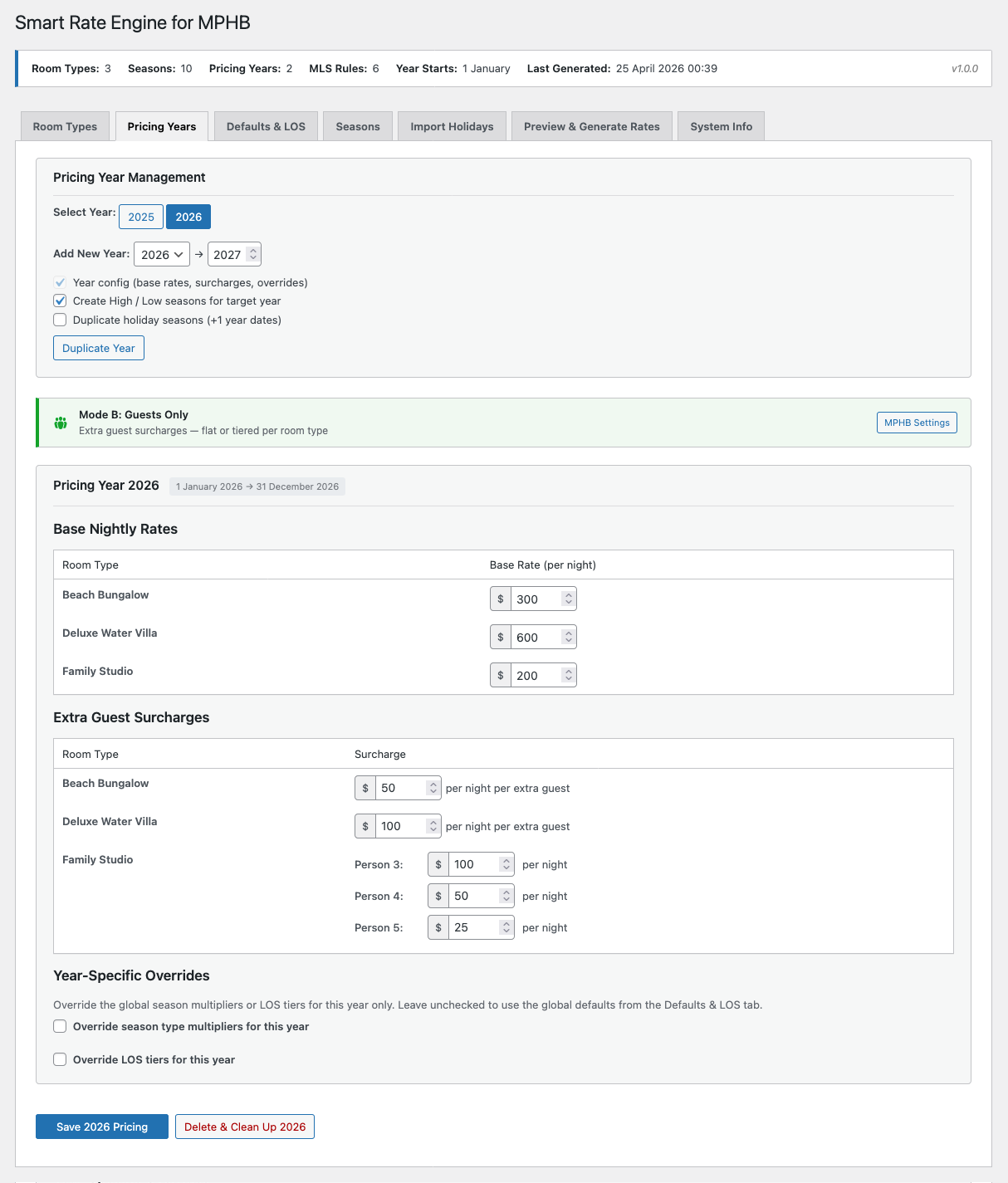
Base Nightly Rates
The base nightly rate is the starting point for all rate calculations. This is the per-night price for the room type before any season or length-of-stay multipliers are applied. Set one base rate per room type per pricing year.
For example, if your Beach Bungalow base rate is $300 per night and your High Season multiplier is ×1.10, the calculated high season rate will be $330 per night.
Extra Guest Surcharges
Set the per-night surcharge for each extra guest above the base occupancy. The fields shown depend on your MPHB guest management mode:
Mode A (Adults & Children): Separate fields for Extra Adult and Extra Child surcharges per room type. Both use flat pricing.
Mode B (Guests Only): A single Guests surcharge field per room type. Flat pricing on Free; tiered pricing available with Pro.
Mode C (Room Rate Only): Surcharge fields are shown but the values won't be charged on the front end — MPHB ignores them in this mode.
By default, season and LOS multipliers also apply to surcharges. A $50 surcharge in High Season (×1.10) becomes $55. You can disable this behaviour on the Defaults & LOS tab under Extra Guest Options.
Year Duplication
Rather than manually re-entering rates for each new year, you can duplicate an existing year's configuration forward.
Free plan: Duplicate the current highest year to the next year. This copies base rates and surcharges only (configuration, not seasons). Available from January 1 of the source year.
Pro plan: Duplicate any year to any year. Optionally include structural seasons (High/Low) and holiday seasons with dates shifted forward by one year.
Pro unlocks flexible year duplication (any year to any year with season duplication), configurable year start date, and per-year overrides for season multipliers and LOS tiers.
Per-Year Overrides Pro
With Pro, season type multipliers and LOS tiers can be overridden per pricing year. This allows you to apply a price increase for a future year without changing your global defaults. For example, you might set 2027's High Season multiplier to ×1.15 instead of the default ×1.10, giving a targeted 5% increase for next year only.
Deleting a Pricing Year
Each pricing year has a Delete & Clean Up button. This removes the year's configuration from SRE and cleans up any orphaned data. It does not delete any rates already written to MPHB — those remain until overwritten by a new generation or manually removed.
Make sure you have another pricing year covering the same date range, or that you no longer need rate generation for that period. Seasons mapped to a deleted pricing year will show as unmapped.