Overview
The Defaults & LOS tab is where you configure the global rules that drive rate calculations. There are four sections: Pricing Year Start Date, Season Types, Default Length of Stay Tiers, and Extra Guest Options.
Navigate to Hotel Booking → Smart Rate Engine → Defaults & LOS.
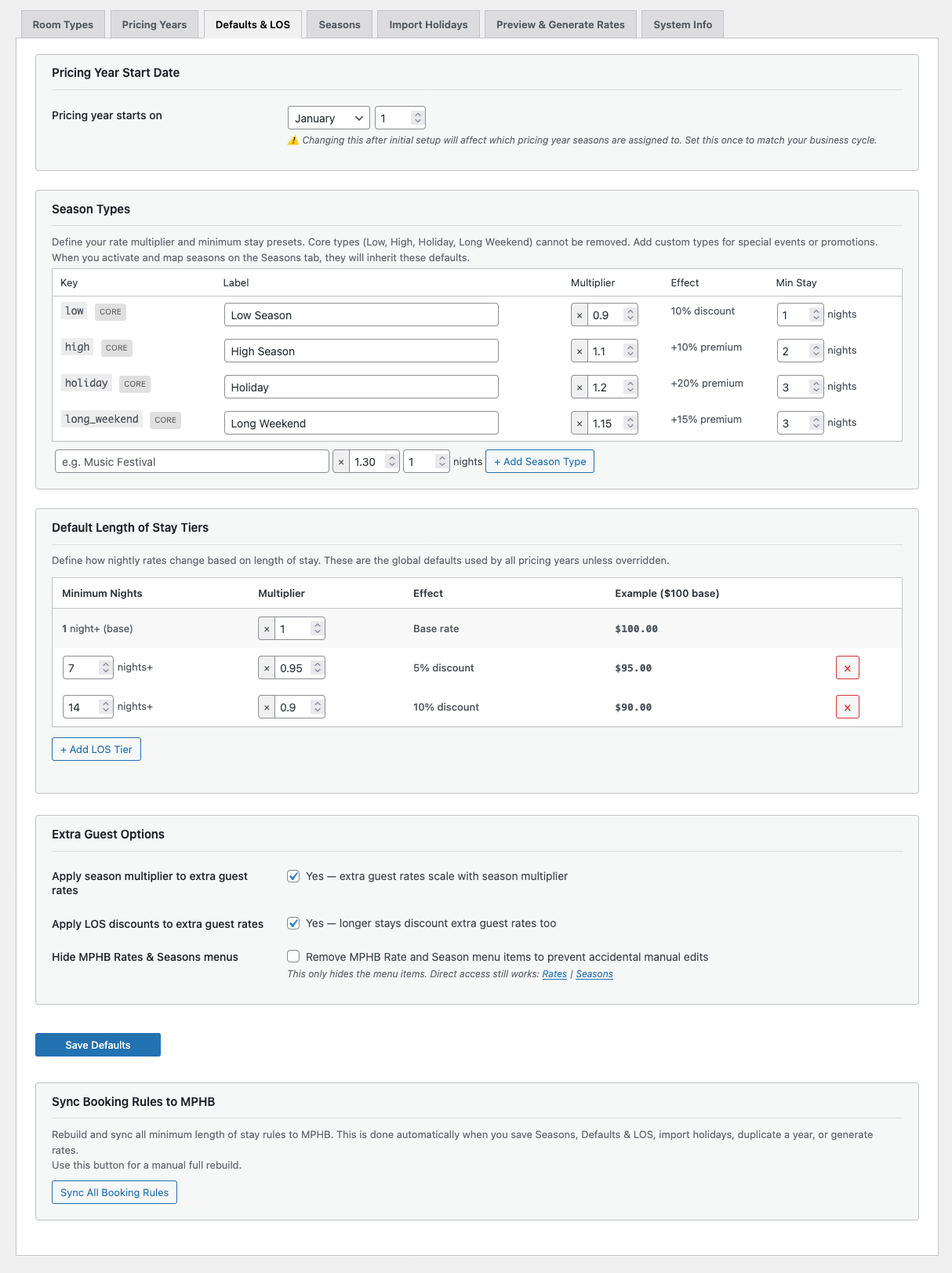
Pricing Year Start Date
By default, pricing years start on January 1. This works for most properties. If your pricing cycle aligns to a different date (for example, April 1 for a financial year rollover), Pro lets you configure a custom start date.
The start date determines which pricing year a season belongs to. A season starting on 15 March with a January 1 year start belongs to the current calendar year. With an April 1 year start, that same season would belong to the previous pricing year.
Custom pricing year start date is a Pro feature. Free uses a fixed January 1 start.
Season Types
Season types are the pricing categories that your MPHB seasons map to. Each season type has a customisable rate multiplier and a default minimum stay.
The configurable rate multiplier scales the base nightly rate. A multiplier of ×1.00 means base rate (Low Season), ×1.10 means a 10% premium (High Season), ×1.20 means a 20% premium (Holiday), and so on.
The configurable minimum stay is the default minimum length of stay for all seasons of this type. Individual seasons can override this on the Seasons tab.
Three core season types are always available:
| Type | Default Multiplier | Default Min Stay | Typical Use |
|---|---|---|---|
| Low Season | ×1.00 | 1 night | Base rate period, shoulder seasons |
| High Season | ×1.10 | 2 nights | Peak demand periods, school holidays |
| Holiday | ×1.20 | 3 nights | Christmas, Easter, public holidays |
Pro adds Long Weekend (default ×1.15, 3-night minimum) and the ability to create custom season types for special events or promotions.
Labels are editable — you can rename "Low Season" to "Standard" or "Holiday" to "Peak" if that better matches your property's terminology. The underlying key remains the same.
Length of Stay Tiers
LOS tiers define how the nightly rate changes based on how long a guest books. This is one of SRE's most powerful features — it automates the length-of-stay discounting that most properties manage manually.
Each tier has a minimum nights threshold and a multiplier. The base tier (1 night) is always present and cannot be removed — its multiplier defaults to ×1.00 but can be edited.
Example with three tiers:
| Tier | Multiplier | Effect | Example ($300 base) |
|---|---|---|---|
| 1+ nights (base) | ×1.00 | Base rate | $300 |
| 7+ nights | ×0.95 | 5% discount | $285 |
| 14+ nights | ×0.90 | 10% discount | $270 |
Free plan supports 3 tiers total (1 locked base + 2 additional). Pro supports unlimited tiers — useful for properties that offer progressive weekly and monthly discounts.
Length-of-stay tier pricing requires MotoPress Hotel Booking Premium to display on the front end. MPHB Lite will ignore LOS tier data — SRE writes it correctly, but Lite's front end does not read the LOS fields. If you're using Lite, only the base tier (1+ nights) will apply to guest-facing pricing.
Season and LOS multipliers stack multiplicatively. A $300 base rate in High Season (×1.10) for a 7+ night stay (×0.95) calculates as: $300 × 1.10 × 0.95 = $313.50, rounded to $314. All rates are rounded to whole numbers.
Extra Guest Options
Two toggles control how multipliers interact with guest surcharges:
Apply season multiplier to extra guest rates: When enabled, surcharges scale with the season. A $50 surcharge in High Season (×1.10) becomes $55.
Apply LOS discounts to extra guest rates: When enabled, longer stays also discount surcharges. A $50 surcharge for a 7+ night stay (×0.95) becomes $48.
Both are enabled by default. Disable them if you want flat surcharges regardless of season or booking length.
Hide MPHB Rates & Seasons Menus
An optional setting lets you hide the MPHB Rates and Seasons menu items from the WordPress admin. This prevents accidental manual edits to data that SRE manages. Direct URL access still works — this is a convenience guard, not a security measure.
Sync All Booking Rules
At the bottom of the Defaults & LOS tab, you'll find the Sync All Booking Rules button. This rebuilds and syncs all minimum length of stay rules to MPHB.
MLS rules are synced to MPHB automatically when you generate rates. After your first generation, syncing also happens automatically when you save Seasons, save Defaults & LOS, import holidays, or duplicate a year. During initial setup (before your first generation), use this button to manually sync if needed.