Import Holidays requires a Pro licence.
What It Does
Import Holidays connects to Google's public holiday calendars to automatically pull in official public holidays for your country. SRE then creates MPHB seasons for each holiday — complete with season type assignment, date ranges, and minimum stay rules — saving you the manual work of looking up dates and creating seasons one by one.
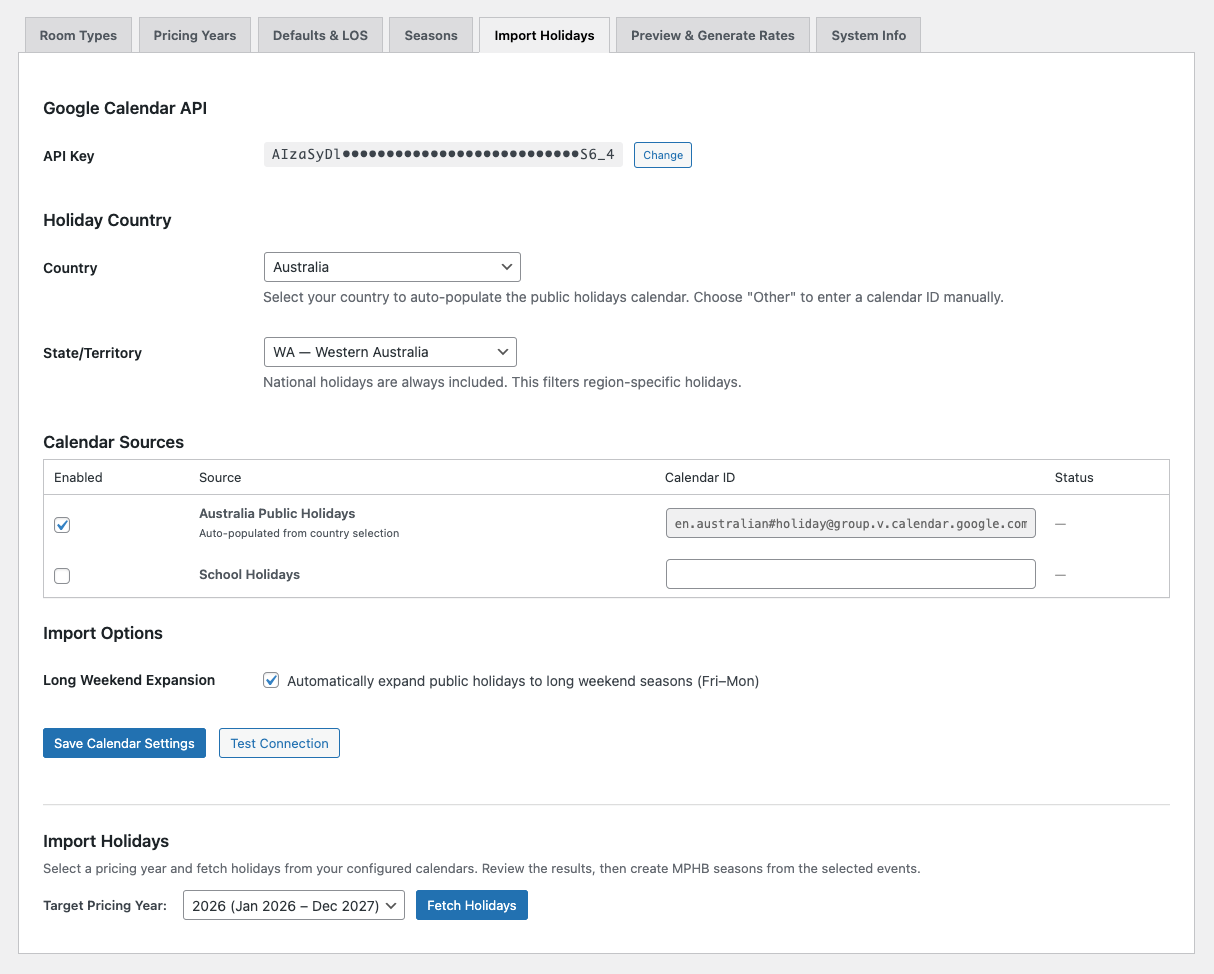
Setup
To use Import Holidays, you need a Google Calendar API key. This is a free API key from Google Cloud Console — it only needs read access to public calendars. SRE does not access any private calendar data.
Getting a Google Calendar API Key
If you don't already have a Google Calendar API key, follow these steps:
1. Go to Google Cloud Console: Visit console.cloud.google.com and sign in with your Google account.
2. Create a project: Click the project selector at the top of the page and select New Project. Give it a name (for example, "SRE Holiday Import") and click Create.
3. Enable the Google Calendar API: Navigate to APIs & Services → Library. Search for "Google Calendar API" and click Enable.
4. Create an API key: Navigate to APIs & Services → Credentials. Click Create Credentials → API Key. Your new API key will be displayed — copy it.
5. Restrict the key (recommended): Click Edit API key, then under "API restrictions" select Restrict key and choose only Google Calendar API. This limits the key to calendar access only.
6. Paste into SRE: Navigate to Hotel Booking → Smart Rate Engine → Import Holidays and paste your API key into the API Key field.
Google Calendar API is free for public calendar access. There are no charges for reading public holiday calendar data. The API key does not grant access to any private calendars.
Country and Region Selection
Once configured, select your country from the dropdown. SRE supports 20 countries with pre-configured Google Calendar IDs. The calendar ID is auto-populated when you select a country — you don't need to find or enter it manually.
If your country has regional holidays (for example, Australian state-specific public holidays), you can select a region to filter results.
Holiday Classification
When holidays are imported, SRE classifies each one as either a Holiday or Long Weekend season type:
Single-day public holidays that fall adjacent to a weekend (Friday or Monday) are automatically expanded into long weekend seasons — typically a Friday-to-Monday date range. This is one of the most time-saving features: you don't need to manually calculate which public holidays create long weekends. SRE handles the date logic, season creation, and season type assignment in one operation.
Multi-day holidays (like Christmas or Easter) are classified as Holiday seasons with their full date range.
Long Weekend Expansion
When a public holiday falls on a Friday or Monday, SRE automatically creates a Fri–Mon long weekend season. The default minimum stay for long weekends is 3 nights — configurable on the Defaults & LOS tab.
When a public holiday falls mid-week (Tuesday, Wednesday, or Thursday), it's created as a single-day Holiday season. SRE doesn't assume guests will bridge to the weekend — that varies too much by market.
Duplicate Detection
SRE checks for existing MPHB seasons that overlap with imported holidays. If a season already exists covering the same dates, SRE skips it to avoid creating duplicates. This makes it safe to re-run imports — you won't end up with redundant overlapping seasons.
After Import
Imported seasons appear on the Seasons tab like any other season. They're automatically assigned to the correct season type (Holiday or Long Weekend) and inherit the type's default multiplier and minimum stay. You can override these values per-season or per-room-type just like any manually created season.
MLS rules are synced to MPHB automatically after import.
SRE supports public holiday calendars for 20 countries including Australia, United States, United Kingdom, Canada, New Zealand, Germany, France, Spain, Italy, and more. The full list is available in the Import Holidays tab once Pro is activated.